Create an API key, find your companies object and make your first three calls.
This guide takes about five minutes. You need a Heliyos workspace where you are an owner or admin.
1
Create an API key
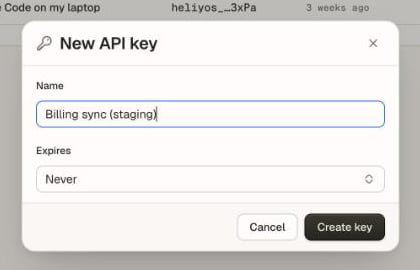
In Heliyos, open Settings → API keys and click New key. Name it after where it will run, set an expiry if you want one, then click Create key and copy the key. It starts with heliyos_ and is shown once.
Settings → API keys → New key. Name it after where it will run.
Keep it in an environment variable rather than in code:
export HELIYOS_API_KEY="heliyos_..."
See Authentication for what a key can do and how to rotate it.
2
Check the key
Every request sends the key as a bearer token. Read your workspace:
{"docsConfig":{"theme":"mint","$schema":"https://mintlify.com/docs.json","name":"Heliyos","description":"Developer docs for Heliyos, the AI operating system for revenue. Build on its unified customer memory and AI workers with the REST API and the MCP server.","colors":{"primary":"#27251E","light":"#FFD037","dark":"#27251E"},"logo":{"light":"https://mintcdn.com/heliyos/j131RqihzUCqTT55/logo/light.png?fit=max\u0026auto=format\u0026n=j131RqihzUCqTT55\u0026q=85\u0026s=b4ac5cbb6af42223e13e9abe4295155d","dark":"https://mintcdn.com/heliyos/j131RqihzUCqTT55/logo/dark.png?fit=max\u0026auto=format\u0026n=j131RqihzUCqTT55\u0026q=85\u0026s=e6755b09abefd37df8199b6a504a8a54","href":"https://www.heliyos.ai"},"favicon":"https://mintcdn.com/heliyos/j131RqihzUCqTT55/favicon.png?fit=max\u0026auto=format\u0026n=j131RqihzUCqTT55\u0026q=85\u0026s=13f98b158bbf66355eb23e7f3b0468a1","api":{"params":{"expanded":"closed"},"playground":{"display":"interactive"},"examples":{"defaults":"all","languages":["curl","javascript","python"]}},"appearance":{"default":"system","strict":false},"background":{"color":{"light":"#FAF7F3","dark":"#1E1C17"}},"navbar":{"links":[{"icon":"brand-github","href":"https://github.com/heliyos-ai","label":"GitHub"},{"icon":"brand-linkedin","href":"https://www.linkedin.com/company/heliyos","label":"LinkedIn"}],"primary":{"type":"button","label":"Join waitlist","href":"https://www.heliyos.ai"}},"seo":{"metatags":{"og:site_name":"Heliyos","og:locale":"en_US","og:type":"website","og:image":"https://www.heliyos.ai/assets/social-preview-2026-10-28.jpeg","og:image:width":"1200","og:image:height":"630","og:image:alt":"Heliyos: The AI operating system for revenue","twitter:card":"summary_large_image","twitter:image":"https://www.heliyos.ai/assets/social-preview-2026-10-28.jpeg","twitter:image:alt":"Heliyos: The AI operating system for revenue","keywords":"Heliyos API, Heliyos MCP server, AI operating system for revenue, AI workers, customer memory, CRM API, MCP server for sales","canonical":"https://docs.heliyos.ai"},"organization":{"id":"https://www.heliyos.ai/#organization","name":"Heliyos","url":"https://www.heliyos.ai","logo":"https://www.heliyos.ai/assets/brand/logo-color.png","sameAs":["https://www.heliyos.ai","https://www.linkedin.com/company/heliyos","https://github.com/heliyos-ai","https://www.npmjs.com/package/@heliyos/mcp"]},"indexing":"navigable"},"fonts":{"family":"Geist","source":"fonts/Geist-Variable.woff2","format":"woff2"},"icons":{"library":"tabler"},"styling":{"eyebrows":"section","codeblocks":"dark","latex":false},"contextual":{"options":["copy","view","chatgpt","claude","cursor","vscode"],"display":"header"},"thumbnails":{"preset":"headline","appearance":"light","surface":"neutral"},"metadata":{"timestamp":true},"navigation":{"pages":[]}},"deployment":{"deploymentMetadataValue":{"subdomain":"heliyos","hasAudioNarration":false,"actualSubdomain":"heliyos","customDomains":["docs.heliyos.ai"],"gitSource":{"type":"github","owner":"heliyos-ai","repo":"heliyos-docs","deployBranch":"main","contentDirectory":"","isPrivate":false,"mountPath":"","label":"","_id":"6aec32751dd5aac17d4d14c7"},"chroma":{"latestBuiltDeploymentHistoryId":"6aecaf0264441d6863c94524","collectionId":"5c85d994-5da1-4fb6-b1f0-7110b5fe061b","liveDeploymentHistoryId":"6aecaf0264441d6863c94524","schemaVersion":"v3"},"feedback":{"thumbs":true,"edits":false,"issues":true},"entitlements":{"AI_CHAT":{"status":"ENABLED"},"WEB_MCP":{"status":"ENABLED"},"NARRATION":{"status":"ENABLED"}},"buildId":"6aecb2311f2bb168c88a68bb","clientVersion":"0.0.4067","searchFilterCounts":[{"language":"default","tag":"API reference","count":78},{"language":"default","tag":"MCP server","count":22},{"language":"default","tag":"Tools","count":15},{"language":"default","tag":"Guides","count":14},{"language":"default","tag":"Workers and runs","count":10},{"language":"default","tag":"Scouts","count":9},{"language":"default","tag":"Get started","count":7},{"language":"default","tag":"Files","count":6},{"language":"default","tag":"Records","count":6},{"language":"default","tag":"Tasks","count":6}],"searchSettings":{"showContentSnippets":true,"fullPageSearch":true,"isFiltersEnabled":true}},"assistantConfig":{"enableAskAiButton":false,"enableStarterQuestions":false,"enableContextualStarterQuestions":false,"enableAskAiSearchBar":true},"basePath":"","hasChatPermissions":true,"hasWebMcpPermissions":true,"toggles":[{"name":"kill-isr","enabled":true,"variant":{"name":"disabled","enabled":false,"feature_enabled":true},"impressionData":false},{"name":"agent-mintlify-slack","enabled":true,"variant":{"name":"disabled","enabled":false,"feature_enabled":true},"impressionData":false},{"name":"agent-integrations-settings","enabled":true,"variant":{"name":"disabled","enabled":false,"feature_enabled":true},"impressionData":false},{"name":"rbac-expansion","enabled":true,"variant":{"name":"disabled","enabled":false,"feature_enabled":true},"impressionData":false},{"name":"automations-pr-grouping","enabled":true,"variant":{"name":"disabled","enabled":false,"feature_enabled":true},"impressionData":false},{"name":"custom-prefix","enabled":true,"variant":{"name":"disabled","enabled":false,"feature_enabled":true},"impressionData":false},{"name":"analytics-v7","enabled":true,"variant":{"name":"disabled","enabled":false,"feature_enabled":true},"impressionData":false},{"name":"user-flows-analytics","enabled":true,"variant":{"name":"disabled","enabled":false,"feature_enabled":true},"impressionData":false},{"name":"no-publish-flow","enabled":true,"variant":{"name":"disabled","enabled":false,"feature_enabled":true},"impressionData":false},{"name":"workos-onboarding","enabled":true,"variant":{"name":"disabled","enabled":false,"feature_enabled":true},"impressionData":false},{"name":"llms-txt-v2","enabled":true,"variant":{"name":"disabled","enabled":false,"feature_enabled":true},"impressionData":false},{"name":"snapshot-serving-live","enabled":true,"variant":{"name":"disabled","enabled":false,"feature_enabled":true},"impressionData":false},{"name":"stripTemperatureMiddleware","enabled":true,"variant":{"name":"disabled","enabled":false,"feature_enabled":true},"impressionData":false},{"name":"support-platform-pylon-zendesk","enabled":true,"variant":{"name":"disabled","enabled":false,"feature_enabled":true},"impressionData":false},{"name":"snapshot-serving","enabled":true,"variant":{"name":"disabled","enabled":false,"feature_enabled":true},"impressionData":false},{"name":"instant-rollback","enabled":true,"variant":{"name":"disabled","enabled":false,"feature_enabled":true},"impressionData":false},{"name":"granular-notifications-server","enabled":true,"variant":{"name":"disabled","enabled":false,"feature_enabled":true},"impressionData":false},{"name":"granular-notifications","enabled":true,"variant":{"name":"disabled","enabled":false,"feature_enabled":true},"impressionData":false},{"name":"automations-fable","enabled":true,"variant":{"name":"disabled","enabled":false,"feature_enabled":true},"impressionData":false},{"name":"fixed-ai-action-pricing","enabled":true,"variant":{"name":"disabled","enabled":false,"feature_enabled":true},"impressionData":false},{"name":"automation-resolve-merge-conflict","enabled":true,"variant":{"name":"disabled","enabled":false,"feature_enabled":true},"impressionData":false},{"name":"scoped-publishing","enabled":true,"variant":{"name":"disabled","enabled":false,"feature_enabled":true},"impressionData":false},{"name":"mintql","enabled":true,"variant":{"name":"disabled","enabled":false,"feature_enabled":true},"impressionData":false},{"name":"page-level-analytics","enabled":true,"variant":{"name":"disabled","enabled":false,"feature_enabled":true},"impressionData":false},{"name":"editor-version-history-v2","enabled":true,"variant":{"name":"disabled","enabled":false,"feature_enabled":true},"impressionData":false},{"name":"billing-page-v2","enabled":true,"variant":{"name":"disabled","enabled":false,"feature_enabled":true},"impressionData":false},{"name":"full-page-search","enabled":true,"variant":{"name":"disabled","enabled":false,"feature_enabled":true},"impressionData":false},{"name":"workspace-projects","enabled":true,"variant":{"name":"disabled","enabled":false,"feature_enabled":true},"impressionData":false},{"name":"assistant-v5","enabled":true,"variant":{"name":"disabled","enabled":false,"feature_enabled":true},"impressionData":false},{"name":"fork-pr-previews","enabled":true,"variant":{"name":"disabled","enabled":false,"feature_enabled":true},"impressionData":false},{"name":"revalidation-jwt","enabled":true,"variant":{"name":"disabled","enabled":false,"feature_enabled":true},"impressionData":false},{"name":"vite-origin","enabled":true,"variant":{"name":"disabled","enabled":false,"feature_enabled":true},"impressionData":false},{"name":"workos-sso-scim","enabled":true,"variant":{"name":"disabled","enabled":false,"feature_enabled":true},"impressionData":false},{"name":"hobby-abuse-scan","enabled":true,"variant":{"name":"disabled","enabled":false,"feature_enabled":true},"impressionData":false},{"name":"dashboard-inbox","enabled":true,"variant":{"name":"disabled","enabled":false,"feature_enabled":true},"impressionData":false},{"name":"workos-signup","enabled":true,"variant":{"name":"disabled","enabled":false,"feature_enabled":true},"impressionData":false},{"name":"turbopuffer-dual-write","enabled":true,"variant":{"name":"disabled","enabled":false,"feature_enabled":true},"impressionData":false},{"name":"workos-enabled","enabled":true,"variant":{"name":"disabled","enabled":false,"feature_enabled":true},"impressionData":false},{"name":"approve-review-flow","enabled":true,"variant":{"name":"disabled","enabled":false,"feature_enabled":true},"impressionData":false},{"name":"sso-setup-deadline-banner","enabled":true,"variant":{"name":"disabled","enabled":false,"feature_enabled":true},"impressionData":false},{"name":"turbopuffer-serve","enabled":true,"variant":{"name":"disabled","enabled":false,"feature_enabled":true},"impressionData":false},{"name":"live-agents","enabled":true,"variant":{"name":"disabled","enabled":false,"feature_enabled":true},"impressionData":false}],"googleFontsInlined":false},"customCss":[{"filePath":"style.css","content":"@font-face{font-family:\"Gambetta\";src:url(\"/fonts/Gambetta-Regular.woff2\") format(\"woff2\");font-weight:400;font-style:normal;font-display:swap}@font-face{font-family:\"Gambetta\";src:url(\"/fonts/Gambetta-Italic.woff2\") format(\"woff2\");font-weight:400;font-style:italic;font-display:swap}@font-face{font-family:\"Geist\";src:url(\"/fonts/Geist-Variable.woff2\") format(\"woff2\");font-weight:100 900;font-style:normal;font-display:swap}@font-face{font-family:\"Geist Mono\";src:url(\"/fonts/GeistMono-Variable.woff2\") format(\"woff2\");font-weight:100 900;font-style:normal;font-display:swap}:root{--hy-canvas: #FAF7F3;--hy-surface: #FEFDFB;--hy-zone: #F3EEE6;--hy-line: #E1DCD3;--hy-line-strong: #D1CBC2;--hy-text: #27251E;--hy-text-body: #4A4742;--hy-text-muted: #6D6A64;--hy-code-bg: #27251E;--hy-code-line: #3A372F;--hy-sun: #FFD037;--hy-sun-soft: #FFE58F;--hy-sun-wash: #FBF1C7;--hy-sun-deep: #EBB427;--hy-sun-ink: #815C0A;--hy-ink: #14120F;--hy-icon-filter: none;--hy-get-bg: #E5F5E7;--hy-get-fg: #287C42;--hy-get-edge: #B6DDBD;--hy-post-bg: #E5F2FF;--hy-post-fg: #2D5277;--hy-post-edge: #BBD6F3;--hy-put-bg: #F4ECFE;--hy-put-fg: #594571;--hy-put-edge: #DACBEE;--hy-patch-bg: #FFECDC;--hy-patch-fg: #9C5313;--hy-patch-edge: #F6C6A0;--hy-del-bg: #FFEAE7;--hy-del-fg: #B8433A;--hy-del-edge: #F6C3BB;--hy-warn-bg: #FFECDC;--hy-warn-fg: #9C5313;--hy-warn-edge: #F6C6A0;--hy-ok-bg: #E5F5E7;--hy-ok-fg: #287C42;--hy-ok-edge: #B6DDBD;--hy-bad-bg: #FFEAE7;--hy-bad-fg: #B8433A;--hy-bad-edge: #F6C3BB}html.dark{--hy-canvas: #1E1C17;--hy-surface: #27251E;--hy-zone: #3A372F;--hy-line: #3A372F;--hy-line-strong: #4A4742;--hy-text: #F3EEE6;--hy-text-body: #EBE5DB;--hy-text-muted: #A9A49B;--hy-code-bg: #14120F;--hy-code-line: #3A372F;--hy-sun-ink: #FFE58F;--hy-icon-filter: invert(0.93) sepia(0.08);--hy-get-bg: rgba(60, 154, 88, 0.18);--hy-get-fg: #B6DDBD;--hy-get-edge: rgba(60, 154, 88, 0.45);--hy-post-bg: rgba(85, 138, 192, 0.2);--hy-post-fg: #BBD6F3;--hy-post-edge: rgba(85, 138, 192, 0.5);--hy-put-bg: rgba(148, 118, 183, 0.2);--hy-put-fg: #DACBEE;--hy-put-edge: rgba(148, 118, 183, 0.5);--hy-patch-bg: rgba(219, 125, 36, 0.18);--hy-patch-fg: #F6C6A0;--hy-patch-edge: rgba(219, 125, 36, 0.45);--hy-del-bg: rgba(208, 90, 79, 0.2);--hy-del-fg: #F6C3BB;--hy-del-edge: rgba(208, 90, 79, 0.5);--hy-warn-bg: rgba(219, 125, 36, 0.14);--hy-warn-fg: #F6C6A0;--hy-warn-edge: rgba(219, 125, 36, 0.4);--hy-ok-bg: rgba(60, 154, 88, 0.14);--hy-ok-fg: #B6DDBD;--hy-ok-edge: rgba(60, 154, 88, 0.4);--hy-bad-bg: rgba(208, 90, 79, 0.16);--hy-bad-fg: #F6C3BB;--hy-bad-edge: rgba(208, 90, 79, 0.45)}body,button,input,select,textarea{font-family:\"Geist\", system-ui, sans-serif}code,pre,kbd,.font-mono{font-family:\"Geist Mono\", ui-monospace, monospace!important}body{background:var(--hy-canvas)!important;color:var(--hy-text)}.prose{color:var(--hy-text-body)}.prose h1,.prose h2,.prose h3,.prose h4,.prose strong,#page-title{color:var(--hy-text)!important}.prose h2{letter-spacing:-0.01em}.prose a:not([class]){color:var(--hy-text);font-weight:500;text-decoration:underline;text-decoration-color:var(--hy-sun-deep);text-decoration-thickness:2px;text-underline-offset:3px;border-bottom:none}.prose a:not([class]):hover{text-decoration-color:var(--hy-text)}img[src^=\"/icons/\"]{filter:var(--hy-icon-filter)}.nav-tabs-item{color:var(--hy-text-muted)!important}.nav-tabs-item:hover{color:var(--hy-text)!important}.nav-tabs-item[data-active=\"true\"]{color:var(--hy-text)!important;font-weight:600}.nav-tabs-item [class*=\"bottom-0\"][class*=\"bg-primary\"]{background:var(--hy-sun-deep)!important;height:2px!important;border-radius:2px}#sidebar-content a{border-radius:8px;transition:background-color .12s ease}#sidebar-content a:not([aria-current=\"page\"]):hover{background:var(--hy-zone);color:var(--hy-text)!important}#sidebar-content a[aria-current=\"page\"]{background:var(--hy-sun-deep)!important;color:var(--hy-ink)!important;border-color:var(--hy-sun-deep)!important;font-weight:600;text-shadow:none!important}#sidebar-content a[aria-current=\"page\"] img[src^=\"/icons/\"]{filter:none}#sidebar-content a[aria-current=\"page\"] [class*=\"bg-[#\"]{background:var(--hy-ink)!important;color:var(--hy-sun)!important;box-shadow:none}[class*=\"bg-green-400/20\"]{background:var(--hy-get-bg)!important;color:var(--hy-get-fg)!important;box-shadow:inset 0 0 0 1px var(--hy-get-edge)}[class*=\"bg-blue-400/20\"]{background:var(--hy-post-bg)!important;color:var(--hy-post-fg)!important;box-shadow:inset 0 0 0 1px var(--hy-post-edge)}[class*=\"bg-purple-400/20\"],[class*=\"bg-yellow-400/20\"]{background:var(--hy-put-bg)!important;color:var(--hy-put-fg)!important;box-shadow:inset 0 0 0 1px var(--hy-put-edge)}[class*=\"bg-orange-400/20\"]{background:var(--hy-patch-bg)!important;color:var(--hy-patch-fg)!important;box-shadow:inset 0 0 0 1px var(--hy-patch-edge)}[class*=\"bg-red-400/20\"]{background:var(--hy-del-bg)!important;color:var(--hy-del-fg)!important;box-shadow:inset 0 0 0 1px var(--hy-del-edge)}.method-pill{letter-spacing:0.02em}.card{background:var(--hy-surface)!important;border-color:var(--hy-line)!important;border-radius:16px!important;box-shadow:none!important;transition:border-color .15s ease, box-shadow .15s ease}.card:hover{border-color:var(--hy-sun-deep)!important;box-shadow:0 8px 24px -8px rgba(39,37,30,.18), 0 2px 4px rgba(39,37,30,.05)!important}.card [class*=\"size-6\"]:has(>img){width:40px!important;height:40px!important;display:grid;place-items:center;background:var(--hy-sun-wash);border:1px solid var(--hy-sun-soft);border-radius:10px}html.dark .card [class*=\"size-6\"]:has(>img){background:rgba(255, 208, 55, 0.12);border-color:rgba(255, 208, 55, 0.3)}.card [class*=\"size-6\"]:has(>img) img{width:22px!important;height:22px!important}.card h2{color:var(--hy-text)!important}.prose :not(pre)>code{background:var(--hy-zone);border:1px solid var(--hy-line);border-radius:7px;padding:1px 6px;color:var(--hy-text);font-size:0.875em}.code-block,[class*=\"code-block\"]{background:var(--hy-code-bg)!important;border-color:var(--hy-code-line)!important;border-radius:12px!important}.prose table{border-color:var(--hy-line)}.prose thead th{background:var(--hy-zone);color:var(--hy-text-muted);font-family:\"Geist Mono\", ui-monospace, monospace;font-size:11px;font-weight:500;letter-spacing:0.04em;text-transform:uppercase}.prose td,.prose th{border-color:var(--hy-line)}.callout{border-radius:12px!important}.callout[data-callout-type=\"note\"],.callout[data-callout-type=\"info\"]{background:var(--hy-sun-wash)!important;border-color:var(--hy-sun-soft)!important;color:var(--hy-text)!important;box-shadow:inset 3px 0 0 var(--hy-sun-deep)}html.dark .callout[data-callout-type=\"note\"],html.dark .callout[data-callout-type=\"info\"]{background:rgba(255,208,55,0.10)!important;border-color:rgba(255,208,55,0.3)!important}.callout[data-callout-type=\"warning\"]{background:var(--hy-warn-bg)!important;border-color:var(--hy-warn-edge)!important;color:var(--hy-warn-fg)!important}.callout[data-callout-type=\"tip\"],.callout[data-callout-type=\"check\"]{background:var(--hy-ok-bg)!important;border-color:var(--hy-ok-edge)!important;color:var(--hy-ok-fg)!important}.callout[data-callout-type=\"danger\"]{background:var(--hy-bad-bg)!important;border-color:var(--hy-bad-edge)!important;color:var(--hy-bad-fg)!important}.callout *{color:inherit}.callout code{background:rgba(255,255,255,.55)!important}html.dark .callout code{background:rgba(0,0,0,.25)!important}.tryit-button{background:var(--hy-sun)!important;color:var(--hy-ink)!important;font-weight:600;border:1px solid var(--hy-sun-deep);border-radius:8px!important;box-shadow:inset 0 1px 0 rgba(255,255,255,.35), 0 1px 2px rgba(20,18,15,.28)}.tryit-button:hover{opacity:1!important;background:var(--hy-sun-deep)!important}.tryit-button svg,.tryit-button path{fill:var(--hy-ink)!important;color:var(--hy-ink)!important}#navbar ul>li:not(.navbar-link)>a{background:linear-gradient(180deg, #3A372F, #27251E);color:#F3EEE6!important;border:1px solid #14120F;border-radius:8px;padding:6px 12px;box-shadow:inset 0 1px 0 rgba(255,255,255,.16), 0 1px 2px rgba(20,18,15,.28)}#navbar ul>li:not(.navbar-link)>a *{color:inherit!important}html.dark #navbar ul>li:not(.navbar-link)>a{background:var(--hy-sun);color:var(--hy-ink)!important;border-color:var(--hy-sun-deep)}#navbar ul>li:not(.navbar-link)>a>span[class*=\"absolute\"]{background:transparent!important}a:focus-visible,button:focus-visible,[role=\"tab\"]:focus-visible{outline:none;box-shadow:0 0 0 2px var(--hy-canvas), 0 0 0 4px var(--hy-text)!important;border-radius:8px}body:has(.hy-hero) #header{display:none}.hy-hero{padding:8px 0 24px}.hy-eyebrow{display:inline-flex;align-items:center;gap:8px;font-family:\"Geist Mono\", ui-monospace, monospace;font-size:11px;font-weight:500;letter-spacing:0.05em;color:var(--hy-sun-ink);margin:0 0 16px;background:var(--hy-sun-wash);border:1px solid var(--hy-sun-soft);border-radius:999px;padding:4px 10px}html.dark .hy-eyebrow{background:rgba(255,208,55,0.12);border-color:rgba(255,208,55,0.3)}.hy-display{font-family:\"Gambetta\", Georgia, serif!important;font-weight:400!important;font-size:56px!important;line-height:1.05;letter-spacing:-0.02em;color:var(--hy-text)!important;margin:0 0 16px}.hy-display em{font-style:italic}.hy-lede{font-size:17px;line-height:1.6;color:var(--hy-text-body);max-width:720px;margin:0}@media (max-width: 640px){.hy-display{font-size:40px!important;line-height:1.1;letter-spacing:-0.015em}}@media (prefers-reduced-motion: reduce){*,*::before,*::after{animation:none!important;transition:none!important}}[class*=\"group/step-indicator\"]{background:var(--hy-sun)!important;color:var(--hy-ink)!important;box-shadow:inset 0 0 0 1px var(--hy-sun-deep)}.steps [class*=\"border-l\"],.steps [class*=\"w-px\"]{border-color:var(--hy-sun-soft)!important;background-color:var(--hy-sun-soft)}html.dark .steps [class*=\"border-l\"],html.dark .steps [class*=\"w-px\"]{border-color:rgba(255,208,55,0.3)!important;background-color:rgba(255,208,55,0.3)}#sidebar-content ul.sidebar-group>li>a{margin-left:22px}#sidebar-content .sidebar-group-header{color:var(--hy-text)!important;font-weight:600}.hy-picker{margin:24px 0;border:1px solid var(--hy-line);border-radius:16px;background:var(--hy-surface);overflow:hidden}.hy-picker-tabs{display:grid;grid-template-columns:repeat(auto-fit, minmax(150px, 1fr));border-bottom:1px solid var(--hy-line)}.hy-picker-tab{display:flex;align-items:center;gap:10px;padding:14px 16px;text-align:left;cursor:pointer;background:transparent;border:0;border-right:1px solid var(--hy-line);border-bottom:1px solid var(--hy-line);margin-bottom:-1px;box-shadow:inset 0 2px 0 transparent;transition:background-color .12s ease}.hy-picker-tab:hover{background:var(--hy-zone)}.hy-picker-tab.is-active{background:var(--hy-sun-wash);box-shadow:inset 0 2px 0 var(--hy-sun-deep)}html.dark .hy-picker-tab.is-active{background:rgba(255,208,55,0.12)}.hy-picker-logo{width:32px;height:32px;flex-shrink:0;display:grid;place-items:center;background:#FEFDFB;border:1px solid #E1DCD3;border-radius:8px}.hy-picker-logo img{width:18px;height:18px;filter:none!important}.hy-picker-label{display:flex;flex-direction:column;min-width:0}.hy-picker-name{font-size:14px;font-weight:600;color:var(--hy-text)}.hy-picker-hint{font-size:12px;color:var(--hy-text-muted)}.hy-picker-panel{padding:8px 20px 12px}.hy-picker-step{display:flex;gap:14px;padding:14px 0;border-top:1px solid var(--hy-line)}.hy-picker-step:first-child{border-top:0}.hy-picker-num{width:24px;height:24px;flex-shrink:0;border-radius:999px;display:grid;place-items:center;background:var(--hy-sun);color:var(--hy-ink);font-size:12px;font-weight:600;box-shadow:inset 0 0 0 1px var(--hy-sun-deep)}.hy-picker-body{flex:1;min-width:0}.hy-picker-title{margin:2px 0 4px;font-size:14px;font-weight:600;color:var(--hy-text)}.hy-picker-text{margin:0 0 8px;font-size:14px;line-height:1.5;color:var(--hy-text-body)}.hy-picker-code{position:relative}.hy-picker-code pre{margin:0;padding:14px 16px;overflow-x:auto;border-radius:10px;background:var(--hy-code-bg);color:#F3EEE6;font-size:12.5px;line-height:1.6}.hy-picker-code code{background:none!important;border:0!important;padding:0!important;color:inherit!important;white-space:pre}.hy-picker-copy{position:absolute;top:8px;right:8px;padding:3px 10px;border-radius:7px;cursor:pointer;font-size:12px;font-weight:500;color:#F3EEE6;background:#3A372F;border:1px solid #4A4742}.hy-picker-copy:hover{background:#45423A}.hy-picker-link{display:inline-flex;align-items:center;margin-top:2px;padding:6px 12px;border-radius:8px;background:var(--hy-sun);color:var(--hy-ink)!important;font-size:13px;font-weight:600;text-decoration:none!important;border:1px solid var(--hy-sun-deep)}.hy-picker-tabs{grid-template-columns:repeat(4, minmax(0, 1fr))}.hy-picker-tab:last-child:nth-child(4n+3){grid-column:span 2}.hy-picker-name{white-space:nowrap;overflow:hidden;text-overflow:ellipsis}@media (max-width: 640px){.hy-picker-tabs{grid-template-columns:repeat(2, minmax(0, 1fr))}.hy-picker-tab:last-child:nth-child(4n+3){grid-column:auto}}.hy-picker-name{white-space:normal;font-size:13.5px;line-height:1.25}.hy-picker-head{display:flex;justify-content:space-between;align-items:baseline;gap:16px;margin:24px 0 10px;font-size:14px;color:var(--hy-text-muted)}.hy-picker-head a{color:var(--hy-text)!important;font-weight:500;text-decoration:underline;text-decoration-color:var(--hy-sun-deep);text-decoration-thickness:2px;text-underline-offset:3px}.hy-picker-head+.hy-picker{margin-top:0}.hy-picker-tabs{grid-template-columns:repeat(4, minmax(0, 1fr))}.hy-picker-tab:last-child{border-right:0}.hy-client{margin:12px 0 20px}.hy-client-head{display:flex;align-items:center;gap:10px;padding:14px 20px;border-bottom:1px solid var(--hy-line);background:var(--hy-sun-wash);box-shadow:inset 0 2px 0 var(--hy-sun-deep)}html.dark .hy-client-head{background:rgba(255,208,55,0.10)}.hy-picker-code pre{padding-right:76px}#navbar a[href=\"https://github.com/heliyos-ai\"] .truncate,#navbar a[href*=\"linkedin.com/company/heliyos\"] .truncate{position:absolute;width:1px;height:1px;overflow:hidden;clip:rect(0 0 0 0);white-space:nowrap}#navbar a[href=\"https://github.com/heliyos-ai\"],#navbar a[href*=\"linkedin.com/company/heliyos\"]{padding:6px;border-radius:8px}#navbar a[href=\"https://github.com/heliyos-ai\"]:hover,#navbar a[href*=\"linkedin.com/company/heliyos\"]:hover{background:var(--hy-zone)}#navbar a[href=\"https://github.com/heliyos-ai\"] svg,#navbar a[href*=\"linkedin.com/company/heliyos\"] svg{width:18px;height:18px}#navbar ul:has(>li.navbar-link){gap:2px;align-items:center}#navbar ul:has(>li.navbar-link)>li{margin:0!important}#navbar ul:has(>li.navbar-link)>li:not(.navbar-link){order:-1;margin-right:12px!important}#navbar li.navbar-link>a{padding:6px!important}#navbar li.navbar-link>a svg{width:22px!important;height:22px!important}"}],"page":{"pagePath":"quickstart","slug":"/quickstart","pageMetadata":{"title":"Quickstart","description":"Create an API key, find your companies object and make your first three calls.","keywords":["Heliyos API quickstart","Heliyos API key","first API request","list companies API"],"href":"/quickstart"},"description":{"compiledSource":"\"use strict\";\nconst {jsx: _jsx} = arguments[0];\nconst {useMDXComponents: _provideComponents} = arguments[0];\nfunction _createMdxContent(props) {\n const _components = {\n p: \"p\",\n ..._provideComponents(),\n ...props.components\n };\n return _jsx(_components.p, {\n children: \"Create an API key, find your companies object and make your first three calls.\"\n });\n}\nfunction MDXContent(props = {}) {\n const {wrapper: MDXLayout} = {\n ..._provideComponents(),\n ...props.components\n };\n return MDXLayout ? _jsx(MDXLayout, {\n ...props,\n children: _jsx(_createMdxContent, {\n ...props\n })\n }) : _createMdxContent(props);\n}\nreturn {\n default: MDXContent\n};\n","frontmatter":{},"scope":{}},"pageType":"default","mdx":{"mdxSource":{"compiledSource":"\"use strict\";const{Fragment:_Fragment,jsx:_jsx,jsxs:_jsxs}=arguments[0];const{useMDXComponents:_provideComponents}=arguments[0];function _createMdxContent(props){const _components={a:`a`,code:`code`,p:`p`,pre:`pre`,span:`span`,strong:`strong`,..._provideComponents(),...props.components},{Card,CardGroup,CodeBlock,Frame,Heading,OptimizedImage,Step,Steps}=_components;if(!Card)_missingMdxReference(`Card`,true);if(!CardGroup)_missingMdxReference(`CardGroup`,true);if(!CodeBlock)_missingMdxReference(`CodeBlock`,true);if(!Frame)_missingMdxReference(`Frame`,true);if(!Heading)_missingMdxReference(`Heading`,true);if(!OptimizedImage)_missingMdxReference(`OptimizedImage`,true);if(!Step)_missingMdxReference(`Step`,true);if(!Steps)_missingMdxReference(`Steps`,true);return _jsxs(_Fragment,{children:[_jsx(_components.p,{children:`This guide takes about five minutes. You need a Heliyos workspace where you are an owner or admin.`}),`\n`,_jsxs(Steps,{children:[_jsxs(Step,{title:`Create an API key`,children:[_jsxs(_components.p,{children:[`In Heliyos, open `,_jsx(_components.strong,{children:`Settings → API keys`}),` and click `,_jsx(_components.strong,{children:`New key`}),`. Name it after where it will run, set an expiry if you want one, then click `,_jsx(_components.strong,{children:`Create key`}),` and copy the key. It starts with `,_jsx(_components.code,{children:`heliyos_`}),` and is shown once.`]}),_jsx(Frame,{caption:`Settings → API keys → New key. Name it after where it will run.`,children:_jsx(OptimizedImage,{src:`https://mintcdn.com/heliyos/j131RqihzUCqTT55/images/screenshots/api-keys-new.png?fit=max\u0026auto=format\u0026n=j131RqihzUCqTT55\u0026q=85\u0026s=8f4bc6bf5480241c850048e5cff5d783`,alt:`The New API key dialog with a name and an expiry`,\"data-og-width\":`420`,width:`420`,\"data-og-height\":`270`,height:`270`,\"data-path\":`images/screenshots/api-keys-new.png`,\"data-optimize\":`true`,\"data-opv\":`3`,srcset:`https://mintcdn.com/heliyos/j131RqihzUCqTT55/images/screenshots/api-keys-new.png?w=280\u0026fit=max\u0026auto=format\u0026n=j131RqihzUCqTT55\u0026q=85\u0026s=4b4c5aea330de67e18e444b974bd4531 280w, https://mintcdn.com/heliyos/j131RqihzUCqTT55/images/screenshots/api-keys-new.png?w=560\u0026fit=max\u0026auto=format\u0026n=j131RqihzUCqTT55\u0026q=85\u0026s=838c5594c4db2019a21bf6a7ff2e4578 560w, https://mintcdn.com/heliyos/j131RqihzUCqTT55/images/screenshots/api-keys-new.png?w=840\u0026fit=max\u0026auto=format\u0026n=j131RqihzUCqTT55\u0026q=85\u0026s=b2bbaf3ea2f5d3970e1386ef545d86b1 840w, https://mintcdn.com/heliyos/j131RqihzUCqTT55/images/screenshots/api-keys-new.png?w=1100\u0026fit=max\u0026auto=format\u0026n=j131RqihzUCqTT55\u0026q=85\u0026s=9568cb2e00208de27eedebe47ddb6e5e 1100w, https://mintcdn.com/heliyos/j131RqihzUCqTT55/images/screenshots/api-keys-new.png?w=1650\u0026fit=max\u0026auto=format\u0026n=j131RqihzUCqTT55\u0026q=85\u0026s=5c8c30a0f786e3f9c8efe70a5c47a6cf 1650w, https://mintcdn.com/heliyos/j131RqihzUCqTT55/images/screenshots/api-keys-new.png?w=2500\u0026fit=max\u0026auto=format\u0026n=j131RqihzUCqTT55\u0026q=85\u0026s=06427b7562d9b2d90de2b75a1acc9118 2500w`})}),_jsx(_components.p,{children:`Keep it in an environment variable rather than in code:`}),_jsx(CodeBlock,{filename:``,numberOfLines:`1`,language:`shellscript`,children:_jsx(_components.pre,{className:`shiki shiki-themes dark-plus dark-plus`,style:{backgroundColor:`#0B0C0E`,\"--shiki-dark-bg\":`#0B0C0E`,color:`#D4D4D4`,\"--shiki-dark\":`#D4D4D4`},language:`shellscript`,children:_jsxs(_components.code,{language:`shellscript`,numberOfLines:`1`,children:[_jsxs(_components.span,{className:`line`,children:[_jsx(_components.span,{style:{color:`#569CD6`,\"--shiki-dark\":`#569CD6`},children:`export`}),_jsx(_components.span,{style:{color:`#9CDCFE`,\"--shiki-dark\":`#9CDCFE`},children:` HELIYOS_API_KEY`}),_jsx(_components.span,{style:{color:`#D4D4D4`,\"--shiki-dark\":`#D4D4D4`},children:`=`}),_jsx(_components.span,{style:{color:`#CE9178`,\"--shiki-dark\":`#CE9178`},children:`\"heliyos_...\"`})]}),`\n`]})})}),_jsxs(_components.p,{children:[`See `,_jsx(_components.a,{href:`/authentication`,children:`Authentication`}),` for what a key can do and how to rotate it.`]})]}),_jsxs(Step,{title:`Check the key`,children:[_jsx(_components.p,{children:`Every request sends the key as a bearer token. Read your workspace:`}),_jsx(CodeBlock,{filename:``,numberOfLines:`2`,language:`shellscript`,children:_jsx(_components.pre,{className:`shiki shiki-themes dark-plus dark-plus`,style:{backgroundColor:`#0B0C0E`,\"--shiki-dark-bg\":`#0B0C0E`,color:`#D4D4D4`,\"--shiki-dark\":`#D4D4D4`},language:`shellscript`,children:_jsxs(_components.code,{language:`shellscript`,numberOfLines:`2`,children:[_jsxs(_components.span,{className:`line`,children:[_jsx(_components.span,{style:{color:`#DCDCAA`,\"--shiki-dark\":`#DCDCAA`},children:`curl`}),_jsx(_components.span,{style:{color:`#CE9178`,\"--shiki-dark\":`#CE9178`},children:` https://api-prod.heliyos.ai/v1/platform/organization`}),_jsx(_components.span,{style:{color:`#D7BA7D`,\"--shiki-dark\":`#D7BA7D`},children:` \\\\`})]}),`\n`,_jsxs(_components.span,{className:`line`,children:[_jsx(_components.span,{style:{color:`#569CD6`,\"--shiki-dark\":`#569CD6`},children:` -H`}),_jsx(_components.span,{style:{color:`#CE9178`,\"--shiki-dark\":`#CE9178`},children:` \"Authorization: Bearer `}),_jsx(_components.span,{style:{color:`#9CDCFE`,\"--shiki-dark\":`#9CDCFE`},children:`$HELIYOS_API_KEY`}),_jsx(_components.span,{style:{color:`#CE9178`,\"--shiki-dark\":`#CE9178`},children:`\"`})]}),`\n`]})})}),_jsxs(_components.p,{children:[`A `,_jsx(_components.code,{children:`200`}),` with your workspace’s name means the key works. A `,_jsx(_components.code,{children:`401`}),` means the key is wrong, expired or revoked.`]})]}),_jsxs(Step,{title:`Find the companies object`,children:[_jsxs(_components.p,{children:[`Records belong to an `,_jsx(_components.strong,{children:`object`}),` (companies, people, deals or a custom object). List the objects and note the `,_jsx(_components.code,{children:`id`}),` of the one whose `,_jsx(_components.code,{children:`objectType`}),` is `,_jsx(_components.code,{children:`company`}),`:`]}),_jsx(CodeBlock,{filename:``,numberOfLines:`2`,language:`shellscript`,children:_jsx(_components.pre,{className:`shiki shiki-themes dark-plus dark-plus`,style:{backgroundColor:`#0B0C0E`,\"--shiki-dark-bg\":`#0B0C0E`,color:`#D4D4D4`,\"--shiki-dark\":`#D4D4D4`},language:`shellscript`,children:_jsxs(_components.code,{language:`shellscript`,numberOfLines:`2`,children:[_jsxs(_components.span,{className:`line`,children:[_jsx(_components.span,{style:{color:`#DCDCAA`,\"--shiki-dark\":`#DCDCAA`},children:`curl`}),_jsx(_components.span,{style:{color:`#CE9178`,\"--shiki-dark\":`#CE9178`},children:` https://api-prod.heliyos.ai/v1/platform/base-schemas`}),_jsx(_components.span,{style:{color:`#D7BA7D`,\"--shiki-dark\":`#D7BA7D`},children:` \\\\`})]}),`\n`,_jsxs(_components.span,{className:`line`,children:[_jsx(_components.span,{style:{color:`#569CD6`,\"--shiki-dark\":`#569CD6`},children:` -H`}),_jsx(_components.span,{style:{color:`#CE9178`,\"--shiki-dark\":`#CE9178`},children:` \"Authorization: Bearer `}),_jsx(_components.span,{style:{color:`#9CDCFE`,\"--shiki-dark\":`#9CDCFE`},children:`$HELIYOS_API_KEY`}),_jsx(_components.span,{style:{color:`#CE9178`,\"--shiki-dark\":`#CE9178`},children:`\"`})]}),`\n`]})})}),_jsx(CodeBlock,{filename:`Response (trimmed)`,numberOfLines:`22`,language:`json`,children:_jsx(_components.pre,{className:`shiki shiki-themes dark-plus dark-plus`,style:{backgroundColor:`#0B0C0E`,\"--shiki-dark-bg\":`#0B0C0E`,color:`#D4D4D4`,\"--shiki-dark\":`#D4D4D4`},language:`json`,children:_jsxs(_components.code,{language:`json`,numberOfLines:`22`,children:[_jsx(_components.span,{className:`line`,children:_jsx(_components.span,{style:{color:`#D4D4D4`,\"--shiki-dark\":`#D4D4D4`},children:`{`})}),`\n`,_jsxs(_components.span,{className:`line`,children:[_jsx(_components.span,{style:{color:`#9CDCFE`,\"--shiki-dark\":`#9CDCFE`},children:` \"meta\"`}),_jsx(_components.span,{style:{color:`#D4D4D4`,\"--shiki-dark\":`#D4D4D4`},children:`: {`})]}),`\n`,_jsxs(_components.span,{className:`line`,children:[_jsx(_components.span,{style:{color:`#9CDCFE`,\"--shiki-dark\":`#9CDCFE`},children:` \"message\"`}),_jsx(_components.span,{style:{color:`#D4D4D4`,\"--shiki-dark\":`#D4D4D4`},children:`: `}),_jsx(_components.span,{style:{color:`#CE9178`,\"--shiki-dark\":`#CE9178`},children:`\"Schemas retrieved successfully\"`})]}),`\n`,_jsx(_components.span,{className:`line`,children:_jsx(_components.span,{style:{color:`#D4D4D4`,\"--shiki-dark\":`#D4D4D4`},children:` },`})}),`\n`,_jsxs(_components.span,{className:`line`,children:[_jsx(_components.span,{style:{color:`#9CDCFE`,\"--shiki-dark\":`#9CDCFE`},children:` \"data\"`}),_jsx(_components.span,{style:{color:`#D4D4D4`,\"--shiki-dark\":`#D4D4D4`},children:`: [`})]}),`\n`,_jsx(_components.span,{className:`line`,children:_jsx(_components.span,{style:{color:`#D4D4D4`,\"--shiki-dark\":`#D4D4D4`},children:` {`})}),`\n`,_jsxs(_components.span,{className:`line`,children:[_jsx(_components.span,{style:{color:`#9CDCFE`,\"--shiki-dark\":`#9CDCFE`},children:` \"id\"`}),_jsx(_components.span,{style:{color:`#D4D4D4`,\"--shiki-dark\":`#D4D4D4`},children:`: `}),_jsx(_components.span,{style:{color:`#CE9178`,\"--shiki-dark\":`#CE9178`},children:`\"66a0f1e2d3c4b5a697880001\"`}),_jsx(_components.span,{style:{color:`#D4D4D4`,\"--shiki-dark\":`#D4D4D4`},children:`,`})]}),`\n`,_jsxs(_components.span,{className:`line`,children:[_jsx(_components.span,{style:{color:`#9CDCFE`,\"--shiki-dark\":`#9CDCFE`},children:` \"name\"`}),_jsx(_components.span,{style:{color:`#D4D4D4`,\"--shiki-dark\":`#D4D4D4`},children:`: `}),_jsx(_components.span,{style:{color:`#CE9178`,\"--shiki-dark\":`#CE9178`},children:`\"Company\"`}),_jsx(_components.span,{style:{color:`#D4D4D4`,\"--shiki-dark\":`#D4D4D4`},children:`,`})]}),`\n`,_jsxs(_components.span,{className:`line`,children:[_jsx(_components.span,{style:{color:`#9CDCFE`,\"--shiki-dark\":`#9CDCFE`},children:` \"objectType\"`}),_jsx(_components.span,{style:{color:`#D4D4D4`,\"--shiki-dark\":`#D4D4D4`},children:`: `}),_jsx(_components.span,{style:{color:`#CE9178`,\"--shiki-dark\":`#CE9178`},children:`\"company\"`})]}),`\n`,_jsx(_components.span,{className:`line`,children:_jsx(_components.span,{style:{color:`#D4D4D4`,\"--shiki-dark\":`#D4D4D4`},children:` },`})}),`\n`,_jsx(_components.span,{className:`line`,children:_jsx(_components.span,{style:{color:`#D4D4D4`,\"--shiki-dark\":`#D4D4D4`},children:` {`})}),`\n`,_jsxs(_components.span,{className:`line`,children:[_jsx(_components.span,{style:{color:`#9CDCFE`,\"--shiki-dark\":`#9CDCFE`},children:` \"id\"`}),_jsx(_components.span,{style:{color:`#D4D4D4`,\"--shiki-dark\":`#D4D4D4`},children:`: `}),_jsx(_components.span,{style:{color:`#CE9178`,\"--shiki-dark\":`#CE9178`},children:`\"66a0f1e2d3c4b5a697880002\"`}),_jsx(_components.span,{style:{color:`#D4D4D4`,\"--shiki-dark\":`#D4D4D4`},children:`,`})]}),`\n`,_jsxs(_components.span,{className:`line`,children:[_jsx(_components.span,{style:{color:`#9CDCFE`,\"--shiki-dark\":`#9CDCFE`},children:` \"name\"`}),_jsx(_components.span,{style:{color:`#D4D4D4`,\"--shiki-dark\":`#D4D4D4`},children:`: `}),_jsx(_components.span,{style:{color:`#CE9178`,\"--shiki-dark\":`#CE9178`},children:`\"People\"`}),_jsx(_components.span,{style:{color:`#D4D4D4`,\"--shiki-dark\":`#D4D4D4`},children:`,`})]}),`\n`,_jsxs(_components.span,{className:`line`,children:[_jsx(_components.span,{style:{color:`#9CDCFE`,\"--shiki-dark\":`#9CDCFE`},children:` \"objectType\"`}),_jsx(_components.span,{style:{color:`#D4D4D4`,\"--shiki-dark\":`#D4D4D4`},children:`: `}),_jsx(_components.span,{style:{color:`#CE9178`,\"--shiki-dark\":`#CE9178`},children:`\"people\"`})]}),`\n`,_jsx(_components.span,{className:`line`,children:_jsx(_components.span,{style:{color:`#D4D4D4`,\"--shiki-dark\":`#D4D4D4`},children:` },`})}),`\n`,_jsx(_components.span,{className:`line`,children:_jsx(_components.span,{style:{color:`#D4D4D4`,\"--shiki-dark\":`#D4D4D4`},children:` {`})}),`\n`,_jsxs(_components.span,{className:`line`,children:[_jsx(_components.span,{style:{color:`#9CDCFE`,\"--shiki-dark\":`#9CDCFE`},children:` \"id\"`}),_jsx(_components.span,{style:{color:`#D4D4D4`,\"--shiki-dark\":`#D4D4D4`},children:`: `}),_jsx(_components.span,{style:{color:`#CE9178`,\"--shiki-dark\":`#CE9178`},children:`\"66a0f1e2d3c4b5a697880003\"`}),_jsx(_components.span,{style:{color:`#D4D4D4`,\"--shiki-dark\":`#D4D4D4`},children:`,`})]}),`\n`,_jsxs(_components.span,{className:`line`,children:[_jsx(_components.span,{style:{color:`#9CDCFE`,\"--shiki-dark\":`#9CDCFE`},children:` \"name\"`}),_jsx(_components.span,{style:{color:`#D4D4D4`,\"--shiki-dark\":`#D4D4D4`},children:`: `}),_jsx(_components.span,{style:{color:`#CE9178`,\"--shiki-dark\":`#CE9178`},children:`\"Deals\"`}),_jsx(_components.span,{style:{color:`#D4D4D4`,\"--shiki-dark\":`#D4D4D4`},children:`,`})]}),`\n`,_jsxs(_components.span,{className:`line`,children:[_jsx(_components.span,{style:{color:`#9CDCFE`,\"--shiki-dark\":`#9CDCFE`},children:` \"objectType\"`}),_jsx(_components.span,{style:{color:`#D4D4D4`,\"--shiki-dark\":`#D4D4D4`},children:`: `}),_jsx(_components.span,{style:{color:`#CE9178`,\"--shiki-dark\":`#CE9178`},children:`\"deals\"`})]}),`\n`,_jsx(_components.span,{className:`line`,children:_jsx(_components.span,{style:{color:`#D4D4D4`,\"--shiki-dark\":`#D4D4D4`},children:` }`})}),`\n`,_jsx(_components.span,{className:`line`,children:_jsx(_components.span,{style:{color:`#D4D4D4`,\"--shiki-dark\":`#D4D4D4`},children:` ]`})}),`\n`,_jsx(_components.span,{className:`line`,children:_jsx(_components.span,{style:{color:`#D4D4D4`,\"--shiki-dark\":`#D4D4D4`},children:`}`})}),`\n`]})})})]}),_jsxs(Step,{title:`List companies`,children:[_jsx(_components.p,{children:`Use that id to list the first page of companies, newest first:`}),_jsx(CodeBlock,{filename:``,numberOfLines:`2`,language:`shellscript`,children:_jsx(_components.pre,{className:`shiki shiki-themes dark-plus dark-plus`,style:{backgroundColor:`#0B0C0E`,\"--shiki-dark-bg\":`#0B0C0E`,color:`#D4D4D4`,\"--shiki-dark\":`#D4D4D4`},language:`shellscript`,children:_jsxs(_components.code,{language:`shellscript`,numberOfLines:`2`,children:[_jsxs(_components.span,{className:`line`,children:[_jsx(_components.span,{style:{color:`#DCDCAA`,\"--shiki-dark\":`#DCDCAA`},children:`curl`}),_jsx(_components.span,{style:{color:`#CE9178`,\"--shiki-dark\":`#CE9178`},children:` \"https://api-prod.heliyos.ai/v1/platform/base-schemas/66a0f1e2d3c4b5a697880001/records?limit=10\"`}),_jsx(_components.span,{style:{color:`#D7BA7D`,\"--shiki-dark\":`#D7BA7D`},children:` \\\\`})]}),`\n`,_jsxs(_components.span,{className:`line`,children:[_jsx(_components.span,{style:{color:`#569CD6`,\"--shiki-dark\":`#569CD6`},children:` -H`}),_jsx(_components.span,{style:{color:`#CE9178`,\"--shiki-dark\":`#CE9178`},children:` \"Authorization: Bearer `}),_jsx(_components.span,{style:{color:`#9CDCFE`,\"--shiki-dark\":`#9CDCFE`},children:`$HELIYOS_API_KEY`}),_jsx(_components.span,{style:{color:`#CE9178`,\"--shiki-dark\":`#CE9178`},children:`\"`})]}),`\n`]})})}),_jsxs(_components.p,{children:[`When `,_jsx(_components.code,{children:`meta.pagination.next_cursor`}),` is present, send it back as `,_jsx(_components.code,{children:`cursor`}),` for the next page. See `,_jsx(_components.a,{href:`/api-reference/pagination`,children:`Pagination`}),`.`]})]}),_jsxs(Step,{title:`Write a note on a company`,children:[_jsxs(_components.p,{children:[`Take a company’s `,_jsx(_components.code,{children:`_id`}),` from the list and link a note to it. The note shows on the company’s timeline, and workers read it as customer memory.`]}),_jsx(CodeBlock,{filename:``,numberOfLines:`14`,language:`shellscript`,children:_jsx(_components.pre,{className:`shiki shiki-themes dark-plus dark-plus`,style:{backgroundColor:`#0B0C0E`,\"--shiki-dark-bg\":`#0B0C0E`,color:`#D4D4D4`,\"--shiki-dark\":`#D4D4D4`},language:`shellscript`,children:_jsxs(_components.code,{language:`shellscript`,numberOfLines:`14`,children:[_jsxs(_components.span,{className:`line`,children:[_jsx(_components.span,{style:{color:`#DCDCAA`,\"--shiki-dark\":`#DCDCAA`},children:`curl`}),_jsx(_components.span,{style:{color:`#CE9178`,\"--shiki-dark\":`#CE9178`},children:` https://api-prod.heliyos.ai/v1/platform/notes`}),_jsx(_components.span,{style:{color:`#D7BA7D`,\"--shiki-dark\":`#D7BA7D`},children:` \\\\`})]}),`\n`,_jsxs(_components.span,{className:`line`,children:[_jsx(_components.span,{style:{color:`#569CD6`,\"--shiki-dark\":`#569CD6`},children:` -H`}),_jsx(_components.span,{style:{color:`#CE9178`,\"--shiki-dark\":`#CE9178`},children:` \"Authorization: Bearer `}),_jsx(_components.span,{style:{color:`#9CDCFE`,\"--shiki-dark\":`#9CDCFE`},children:`$HELIYOS_API_KEY`}),_jsx(_components.span,{style:{color:`#CE9178`,\"--shiki-dark\":`#CE9178`},children:`\"`}),_jsx(_components.span,{style:{color:`#D7BA7D`,\"--shiki-dark\":`#D7BA7D`},children:` \\\\`})]}),`\n`,_jsxs(_components.span,{className:`line`,children:[_jsx(_components.span,{style:{color:`#569CD6`,\"--shiki-dark\":`#569CD6`},children:` -H`}),_jsx(_components.span,{style:{color:`#CE9178`,\"--shiki-dark\":`#CE9178`},children:` \"Content-Type: application/json\"`}),_jsx(_components.span,{style:{color:`#D7BA7D`,\"--shiki-dark\":`#D7BA7D`},children:` \\\\`})]}),`\n`,_jsxs(_components.span,{className:`line`,children:[_jsx(_components.span,{style:{color:`#569CD6`,\"--shiki-dark\":`#569CD6`},children:` -d`}),_jsx(_components.span,{style:{color:`#CE9178`,\"--shiki-dark\":`#CE9178`},children:` '{`})]}),`\n`,_jsx(_components.span,{className:`line`,children:_jsx(_components.span,{style:{color:`#CE9178`,\"--shiki-dark\":`#CE9178`},children:` \"title\": \"Intro call\",`})}),`\n`,_jsx(_components.span,{className:`line`,children:_jsx(_components.span,{style:{color:`#CE9178`,\"--shiki-dark\":`#CE9178`},children:` \"content\": \"Interested in the Q1 pilot. Follow up with pricing.\",`})}),`\n`,_jsx(_components.span,{className:`line`,children:_jsx(_components.span,{style:{color:`#CE9178`,\"--shiki-dark\":`#CE9178`},children:` \"relationships\": [`})}),`\n`,_jsx(_components.span,{className:`line`,children:_jsx(_components.span,{style:{color:`#CE9178`,\"--shiki-dark\":`#CE9178`},children:` {`})}),`\n`,_jsx(_components.span,{className:`line`,children:_jsx(_components.span,{style:{color:`#CE9178`,\"--shiki-dark\":`#CE9178`},children:` \"objectId\": \"\u003ccompany id>\",`})}),`\n`,_jsx(_components.span,{className:`line`,children:_jsx(_components.span,{style:{color:`#CE9178`,\"--shiki-dark\":`#CE9178`},children:` \"schemaId\": \"66a0f1e2d3c4b5a697880001\",`})}),`\n`,_jsx(_components.span,{className:`line`,children:_jsx(_components.span,{style:{color:`#CE9178`,\"--shiki-dark\":`#CE9178`},children:` \"objectType\": \"company\"`})}),`\n`,_jsx(_components.span,{className:`line`,children:_jsx(_components.span,{style:{color:`#CE9178`,\"--shiki-dark\":`#CE9178`},children:` }`})}),`\n`,_jsx(_components.span,{className:`line`,children:_jsx(_components.span,{style:{color:`#CE9178`,\"--shiki-dark\":`#CE9178`},children:` ]`})}),`\n`,_jsx(_components.span,{className:`line`,children:_jsx(_components.span,{style:{color:`#CE9178`,\"--shiki-dark\":`#CE9178`},children:` }'`})}),`\n`]})})})]})]}),`\n`,_jsx(Heading,{level:`2`,id:`next-steps`,children:`Next steps`}),`\n`,_jsxs(CardGroup,{cols:2,children:[_jsx(Card,{title:`Core concepts`,icon:`https://mintcdn.com/heliyos/j131RqihzUCqTT55/icons/book.svg?fit=max\u0026auto=format\u0026n=j131RqihzUCqTT55\u0026q=85\u0026s=58b9cc3ba9111348c478733e83bc7098`,href:`/concepts/workspace-and-objects`,\"data-og-width\":`24`,width:`24`,\"data-og-height\":`24`,height:`24`,\"data-path\":`icons/book.svg`,\"data-optimize\":`true`,\"data-opv\":`3`,srcset:`https://mintcdn.com/heliyos/j131RqihzUCqTT55/icons/book.svg?w=280\u0026fit=max\u0026auto=format\u0026n=j131RqihzUCqTT55\u0026q=85\u0026s=9cad372b2ae77efc09ec0b4475490429 280w, https://mintcdn.com/heliyos/j131RqihzUCqTT55/icons/book.svg?w=560\u0026fit=max\u0026auto=format\u0026n=j131RqihzUCqTT55\u0026q=85\u0026s=bcd0fa90d1b6754899dc5e4f788cbaab 560w, https://mintcdn.com/heliyos/j131RqihzUCqTT55/icons/book.svg?w=840\u0026fit=max\u0026auto=format\u0026n=j131RqihzUCqTT55\u0026q=85\u0026s=b43d258dbe331ea7a47e45fa7b85a121 840w, https://mintcdn.com/heliyos/j131RqihzUCqTT55/icons/book.svg?w=1100\u0026fit=max\u0026auto=format\u0026n=j131RqihzUCqTT55\u0026q=85\u0026s=cb90a03cea1a3d13e5565e61861e9a67 1100w, https://mintcdn.com/heliyos/j131RqihzUCqTT55/icons/book.svg?w=1650\u0026fit=max\u0026auto=format\u0026n=j131RqihzUCqTT55\u0026q=85\u0026s=c0e907087b2e8b2c84b0fb1e82994cf8 1650w, https://mintcdn.com/heliyos/j131RqihzUCqTT55/icons/book.svg?w=2500\u0026fit=max\u0026auto=format\u0026n=j131RqihzUCqTT55\u0026q=85\u0026s=086299c2fefba8c94e7f0eb54fb63905 2500w`,children:_jsx(_components.p,{children:`How objects, records, fields, the timeline and workers fit together.`})}),_jsx(Card,{title:`API reference`,icon:`https://mintcdn.com/heliyos/j131RqihzUCqTT55/icons/api.svg?fit=max\u0026auto=format\u0026n=j131RqihzUCqTT55\u0026q=85\u0026s=c6f8e5013d0dadc2217b510bee989586`,href:`/api-reference/introduction`,\"data-og-width\":`24`,width:`24`,\"data-og-height\":`24`,height:`24`,\"data-path\":`icons/api.svg`,\"data-optimize\":`true`,\"data-opv\":`3`,srcset:`https://mintcdn.com/heliyos/j131RqihzUCqTT55/icons/api.svg?w=280\u0026fit=max\u0026auto=format\u0026n=j131RqihzUCqTT55\u0026q=85\u0026s=d06a53cdade75f54b6f99bd2ba7845a9 280w, https://mintcdn.com/heliyos/j131RqihzUCqTT55/icons/api.svg?w=560\u0026fit=max\u0026auto=format\u0026n=j131RqihzUCqTT55\u0026q=85\u0026s=00b6cdff96e40e2fb56d61bce740e458 560w, https://mintcdn.com/heliyos/j131RqihzUCqTT55/icons/api.svg?w=840\u0026fit=max\u0026auto=format\u0026n=j131RqihzUCqTT55\u0026q=85\u0026s=513b4deae591faf69ea56e3c76a5c38f 840w, https://mintcdn.com/heliyos/j131RqihzUCqTT55/icons/api.svg?w=1100\u0026fit=max\u0026auto=format\u0026n=j131RqihzUCqTT55\u0026q=85\u0026s=9f9c057594dc3aa5a57d5de665caf7a0 1100w, https://mintcdn.com/heliyos/j131RqihzUCqTT55/icons/api.svg?w=1650\u0026fit=max\u0026auto=format\u0026n=j131RqihzUCqTT55\u0026q=85\u0026s=4d908a2c420a5ed10417181938cfb57e 1650w, https://mintcdn.com/heliyos/j131RqihzUCqTT55/icons/api.svg?w=2500\u0026fit=max\u0026auto=format\u0026n=j131RqihzUCqTT55\u0026q=85\u0026s=65d4e307d9d83dd467e9dee430f39edb 2500w`,children:_jsx(_components.p,{children:`Every endpoint, parameter and response, with a playground.`})}),_jsx(Card,{title:`Connect an AI agent`,icon:`https://mintcdn.com/heliyos/j131RqihzUCqTT55/icons/plug.svg?fit=max\u0026auto=format\u0026n=j131RqihzUCqTT55\u0026q=85\u0026s=425f65f95ae1d3c777399d353a30de0c`,href:`/mcp/install`,\"data-og-width\":`24`,width:`24`,\"data-og-height\":`24`,height:`24`,\"data-path\":`icons/plug.svg`,\"data-optimize\":`true`,\"data-opv\":`3`,srcset:`https://mintcdn.com/heliyos/j131RqihzUCqTT55/icons/plug.svg?w=280\u0026fit=max\u0026auto=format\u0026n=j131RqihzUCqTT55\u0026q=85\u0026s=85e8c83952c3ebb2e80bffef4c656058 280w, https://mintcdn.com/heliyos/j131RqihzUCqTT55/icons/plug.svg?w=560\u0026fit=max\u0026auto=format\u0026n=j131RqihzUCqTT55\u0026q=85\u0026s=a30f080273f89d60b7022a0fd116e4bc 560w, https://mintcdn.com/heliyos/j131RqihzUCqTT55/icons/plug.svg?w=840\u0026fit=max\u0026auto=format\u0026n=j131RqihzUCqTT55\u0026q=85\u0026s=bf7ab8a6e6d2514e6a7cc4607ed2b96f 840w, https://mintcdn.com/heliyos/j131RqihzUCqTT55/icons/plug.svg?w=1100\u0026fit=max\u0026auto=format\u0026n=j131RqihzUCqTT55\u0026q=85\u0026s=b717a735a8d0006b94dfdfffcf5825af 1100w, https://mintcdn.com/heliyos/j131RqihzUCqTT55/icons/plug.svg?w=1650\u0026fit=max\u0026auto=format\u0026n=j131RqihzUCqTT55\u0026q=85\u0026s=06d938e397954a54088537b7e7dc08d8 1650w, https://mintcdn.com/heliyos/j131RqihzUCqTT55/icons/plug.svg?w=2500\u0026fit=max\u0026auto=format\u0026n=j131RqihzUCqTT55\u0026q=85\u0026s=07eecf0e8e902be7f3bd3c9101f7e499 2500w`,children:_jsx(_components.p,{children:`Use the same key with the Heliyos MCP server in Claude, Cursor or Codex.`})}),_jsx(Card,{title:`Handle errors`,icon:`https://mintcdn.com/heliyos/j131RqihzUCqTT55/icons/alert.svg?fit=max\u0026auto=format\u0026n=j131RqihzUCqTT55\u0026q=85\u0026s=5c5dd0bcd81cb30610de2c0f6d054a4b`,href:`/api-reference/errors`,\"data-og-width\":`24`,width:`24`,\"data-og-height\":`24`,height:`24`,\"data-path\":`icons/alert.svg`,\"data-optimize\":`true`,\"data-opv\":`3`,srcset:`https://mintcdn.com/heliyos/j131RqihzUCqTT55/icons/alert.svg?w=280\u0026fit=max\u0026auto=format\u0026n=j131RqihzUCqTT55\u0026q=85\u0026s=f14d2aea7936fc30fab601978ca7249d 280w, https://mintcdn.com/heliyos/j131RqihzUCqTT55/icons/alert.svg?w=560\u0026fit=max\u0026auto=format\u0026n=j131RqihzUCqTT55\u0026q=85\u0026s=2cfd25ada3d40d13c58ffc743b34a613 560w, https://mintcdn.com/heliyos/j131RqihzUCqTT55/icons/alert.svg?w=840\u0026fit=max\u0026auto=format\u0026n=j131RqihzUCqTT55\u0026q=85\u0026s=a7755fd04d1f4a4d294c5f604f9283af 840w, https://mintcdn.com/heliyos/j131RqihzUCqTT55/icons/alert.svg?w=1100\u0026fit=max\u0026auto=format\u0026n=j131RqihzUCqTT55\u0026q=85\u0026s=427481534e9304e68bbabfc3c13add24 1100w, https://mintcdn.com/heliyos/j131RqihzUCqTT55/icons/alert.svg?w=1650\u0026fit=max\u0026auto=format\u0026n=j131RqihzUCqTT55\u0026q=85\u0026s=dc56075698b3afdde78ddd3362f9e737 1650w, https://mintcdn.com/heliyos/j131RqihzUCqTT55/icons/alert.svg?w=2500\u0026fit=max\u0026auto=format\u0026n=j131RqihzUCqTT55\u0026q=85\u0026s=c70628d7736b304ac8e62c42e77bebca 2500w`,children:_jsx(_components.p,{children:`Error codes, retries and rate limits.`})})]})]})}function MDXContent(props={}){const{wrapper:MDXLayout}={..._provideComponents(),...props.components};return MDXLayout?_jsx(MDXLayout,{...props,children:_jsx(_createMdxContent,{...props})}):_createMdxContent(props)}return{default:MDXContent};function _missingMdxReference(id,component){throw new Error(`Expected `+(component?`component`:`object`)+\" `\"+id+\"` to be defined: you likely forgot to import, pass, or provide it.\")}","frontmatter":{},"scope":{"codeStyling":"dark","config":{},"pageMetadata":{"title":"Quickstart","description":"Create an API key, find your companies object and make your first three calls.","keywords":["Heliyos API quickstart","Heliyos API key","first API request","list companies API"],"href":"/quickstart"}}},"mdxSourceWithNoJs":null},"mdxExtracts":{"tableOfContents":[{"title":"Next steps","slug":"next-steps","depth":2,"children":[]}],"codeExamples":{}},"jsLinks":[],"subdomain":"heliyos","siteName":"Heliyos","title":"Quickstart - Heliyos","relatedPagesConfig":{"enabled":false,"limit":5,"mode":"automatic"},"navMaps":{"firstHrefInVersion":{},"firstHrefInLanguage":{}},"lastModified":"2026-11-05T15:20:46.832Z","gitLastModified":"2026-11-05T15:07:02.000Z","originalFileLocation":"quickstart.mdx"},"headHtml":"\u003cscript data-mint-head>(function(){var d=document.documentElement,p=null;if(!p){try{p=localStorage.getItem(\"isDarkMode\")}catch(e){}if(p==='true')p='dark';else if(p==='false')p='light';if(p!=='light'\u0026\u0026p!=='dark'\u0026\u0026p!=='system')p=\"system\"}var r=p==='system'?(matchMedia(\"(prefers-color-scheme: dark)\").matches?'dark':'light'):p;d.classList.remove(r==='dark'?'light':'dark');d.classList.add(r);d.setAttribute(\"data-theme-preference\",p)})();\u003c/script>\u003cmeta data-mint-head name=\"description\" content=\"Create an API key, find your companies object and make your first three calls.\">\u003cmeta data-mint-head name=\"keywords\" content=\"Heliyos API, Heliyos MCP server, AI operating system for revenue, AI workers, customer memory, CRM API, MCP server for sales\">\u003cmeta data-mint-head name=\"application-name\" content=\"Heliyos\">\u003cmeta data-mint-head name=\"generator\" content=\"Mintlify\">\u003clink data-mint-head rel=\"icon\" type=\"image/png\" sizes=\"192x192\" href=\"/mintlify-assets/_mintlify/favicons/heliyos/VGWcHMG0dpBG1nWt/_generated/favicon/android-chrome-192x192.png\" media=\"(prefers-color-scheme: light)\">\u003clink data-mint-head rel=\"apple-touch-icon\" type=\"image/png\" sizes=\"180x180\" href=\"/mintlify-assets/_mintlify/favicons/heliyos/VGWcHMG0dpBG1nWt/_generated/favicon/apple-touch-icon.png\">\u003clink data-mint-head rel=\"icon\" type=\"image/png\" sizes=\"16x16\" href=\"/mintlify-assets/_mintlify/favicons/heliyos/VGWcHMG0dpBG1nWt/_generated/favicon/favicon-16x16.png\" media=\"(prefers-color-scheme: light)\">\u003clink data-mint-head rel=\"icon\" type=\"image/png\" sizes=\"32x32\" href=\"/mintlify-assets/_mintlify/favicons/heliyos/VGWcHMG0dpBG1nWt/_generated/favicon/favicon-32x32.png\" media=\"(prefers-color-scheme: light)\">\u003clink data-mint-head rel=\"shortcut icon\" type=\"image/x-icon\" href=\"/mintlify-assets/_mintlify/favicons/heliyos/VGWcHMG0dpBG1nWt/_generated/favicon/favicon.ico\" media=\"(prefers-color-scheme: light)\">\u003clink data-mint-head rel=\"icon\" type=\"image/png\" sizes=\"192x192\" href=\"/mintlify-assets/_mintlify/favicons/heliyos/VGWcHMG0dpBG1nWt/_generated/favicon-dark/android-chrome-192x192.png\" media=\"(prefers-color-scheme: dark)\">\u003clink data-mint-head rel=\"icon\" type=\"image/png\" sizes=\"16x16\" href=\"/mintlify-assets/_mintlify/favicons/heliyos/VGWcHMG0dpBG1nWt/_generated/favicon-dark/favicon-16x16.png\" media=\"(prefers-color-scheme: dark)\">\u003clink data-mint-head rel=\"icon\" type=\"image/png\" sizes=\"32x32\" href=\"/mintlify-assets/_mintlify/favicons/heliyos/VGWcHMG0dpBG1nWt/_generated/favicon-dark/favicon-32x32.png\" media=\"(prefers-color-scheme: dark)\">\u003clink data-mint-head rel=\"shortcut icon\" type=\"image/x-icon\" href=\"/mintlify-assets/_mintlify/favicons/heliyos/VGWcHMG0dpBG1nWt/_generated/favicon-dark/favicon.ico\" media=\"(prefers-color-scheme: dark)\">\u003cmeta data-mint-head property=\"og:title\" content=\"Quickstart - Heliyos\">\u003cmeta data-mint-head property=\"og:description\" content=\"Create an API key, find your companies object and make your first three calls.\">\u003cmeta data-mint-head property=\"og:site_name\" content=\"Heliyos\">\u003cmeta data-mint-head property=\"og:url\" content=\"https://docs.heliyos.ai/quickstart\">\u003cmeta data-mint-head property=\"og:type\" content=\"website\">\u003cmeta data-mint-head property=\"og:image\" content=\"https://www.heliyos.ai/assets/social-preview-2026-10-28.jpeg\">\u003cmeta data-mint-head property=\"og:image:width\" content=\"1200\">\u003cmeta data-mint-head property=\"og:image:height\" content=\"630\">\u003cmeta data-mint-head name=\"twitter:card\" content=\"summary_large_image\">\u003cmeta data-mint-head name=\"twitter:title\" content=\"Quickstart - Heliyos\">\u003cmeta data-mint-head name=\"twitter:description\" content=\"Create an API key, find your companies object and make your first three calls.\">\u003cmeta data-mint-head name=\"twitter:image\" content=\"https://www.heliyos.ai/assets/social-preview-2026-10-28.jpeg\">\u003cmeta data-mint-head name=\"twitter:image:width\" content=\"1200\">\u003cmeta data-mint-head name=\"twitter:image:height\" content=\"630\">\u003cmeta data-mint-head name=\"msapplication-config\" content=\"/mintlify-assets/_mintlify/favicons/heliyos/VGWcHMG0dpBG1nWt/_generated/favicon/browserconfig.xml\">\u003cmeta data-mint-head name=\"apple-mobile-web-app-title\" content=\"Heliyos\">\u003cmeta data-mint-head name=\"msapplication-TileColor\" content=\"#27251E\">\u003cmeta data-mint-head name=\"og:locale\" content=\"en_US\">\u003cmeta data-mint-head name=\"og:image:alt\" content=\"Heliyos: The AI operating system for revenue\">\u003cmeta data-mint-head name=\"twitter:image:alt\" content=\"Heliyos: The AI operating system for revenue\">\u003clink data-mint-head rel=\"canonical\" href=\"https://docs.heliyos.ai/quickstart\">\u003clink data-mint-head rel=\"alternate\" type=\"application/xml\" href=\"/sitemap.xml\">\u003clink data-mint-head rel=\"alternate\" type=\"text/markdown\" href=\"/quickstart.md\">\u003cscript data-mint-head type=\"application/ld+json\">{\"@context\":\"https://schema.org\",\"@graph\":[{\"@type\":\"Organization\",\"@id\":\"https://www.heliyos.ai/#organization\",\"name\":\"Heliyos\",\"url\":\"https://www.heliyos.ai\",\"logo\":{\"@type\":\"ImageObject\",\"url\":\"https://www.heliyos.ai/assets/brand/logo-color.png\"},\"sameAs\":[\"https://www.heliyos.ai\",\"https://www.linkedin.com/company/heliyos\",\"https://github.com/heliyos-ai\",\"https://www.npmjs.com/package/@heliyos/mcp\"]},{\"@type\":\"WebSite\",\"@id\":\"https://docs.heliyos.ai#website\",\"name\":\"Heliyos\",\"url\":\"https://docs.heliyos.ai\",\"publisher\":{\"@id\":\"https://www.heliyos.ai/#organization\"}},{\"@type\":\"WebPage\",\"@id\":\"https://docs.heliyos.ai/quickstart#webpage\",\"url\":\"https://docs.heliyos.ai/quickstart\",\"name\":\"Quickstart\",\"description\":\"Create an API key, find your companies object and make your first three calls.\",\"dateModified\":\"2026-11-05T15:07:02.000Z\",\"isPartOf\":{\"@id\":\"https://docs.heliyos.ai#website\"},\"breadcrumb\":{\"@id\":\"https://docs.heliyos.ai/quickstart#breadcrumb\"}},{\"@type\":\"BreadcrumbList\",\"@id\":\"https://docs.heliyos.ai/quickstart#breadcrumb\",\"itemListElement\":[{\"@type\":\"ListItem\",\"position\":1,\"name\":\"Get started\",\"item\":\"https://docs.heliyos.ai/index\"},{\"@type\":\"ListItem\",\"position\":2,\"name\":\"Quickstart\",\"item\":\"https://docs.heliyos.ai/quickstart\"}]},{\"@type\":[\"Article\",\"TechArticle\"],\"@id\":\"https://docs.heliyos.ai/quickstart#article\",\"headline\":\"Quickstart\",\"name\":\"Quickstart\",\"description\":\"Create an API key, find your companies object and make your first three calls.\",\"url\":\"https://docs.heliyos.ai/quickstart\",\"mainEntityOfPage\":{\"@id\":\"https://docs.heliyos.ai/quickstart#webpage\"},\"image\":\"https://www.heliyos.ai/assets/social-preview-2026-10-28.jpeg\",\"dateModified\":\"2026-11-05T15:07:02.000Z\",\"keywords\":\"Heliyos API quickstart, Heliyos API key, first API request, list companies API\",\"publisher\":{\"@id\":\"https://www.heliyos.ai/#organization\"},\"isPartOf\":{\"@id\":\"https://docs.heliyos.ai#website\"}}]}\u003c/script>\u003cscript data-mint-head type=\"application/ld+json\">{\"@context\":\"https://schema.org\",\"@type\":\"WebSite\",\"name\":\"Heliyos\",\"creator\":{\"@type\":\"Organization\",\"name\":\"Mintlify\",\"url\":\"https://mintlify.com\"}}\u003c/script>","siteName":"Heliyos","nav":{"global":null,"tabs":[{"tab":"Guides","icon":"https://mintlify.s3.us-west-1.amazonaws.com/heliyos/icons/tab-guides.svg","groups":[{"group":"Get started","icon":"https://mintlify.s3.us-west-1.amazonaws.com/heliyos/icons/group-start.svg","pages":[{"title":"Heliyos API and MCP server","sidebarTitle":"Introduction","description":"Heliyos is the AI operating system for revenue. Use its REST API and MCP server to read and update customer memory, run AI workers and decide reviews.","mode":"wide","href":""},{"title":"Quickstart","href":"/quickstart"},{"title":"Authentication","description":"Create, use, rotate and revoke workspace API keys.","href":"/authentication"}]},{"group":"Core concepts","icon":"https://mintlify.s3.us-west-1.amazonaws.com/heliyos/icons/app-objects.svg","pages":[{"title":"Workspace and objects","href":"/concepts/workspace-and-objects"},{"title":"Records and fields","href":"/concepts/records-and-fields"},{"title":"Timeline and activity","href":"/concepts/timeline"},{"title":"Workers and review","href":"/concepts/workers-and-review"}]},{"group":"Using the API","icon":"https://mintlify.s3.us-west-1.amazonaws.com/heliyos/icons/api.svg","pages":[{"title":"Pagination","href":"/api-reference/pagination"},{"title":"Filtering and sorting","href":"/api-reference/filtering"},{"title":"Errors","href":"/api-reference/errors"},{"title":"Rate limits","href":"/api-reference/rate-limits"}]},{"group":"Recipes","icon":"https://mintlify.s3.us-west-1.amazonaws.com/heliyos/icons/group-recipes.svg","pages":[{"title":"Sync companies from your system","href":"/guides/sync-companies"},{"title":"Upload a file","href":"/guides/upload-a-file"},{"title":"Run workers on a task","href":"/guides/run-workers-on-a-task"}]}]},{"tab":"API reference","icon":"https://mintlify.s3.us-west-1.amazonaws.com/heliyos/icons/tab-api.svg","pages":[{"title":"API reference","href":"/api-reference/introduction"}]},{"tab":"MCP server","icon":"https://mintlify.s3.us-west-1.amazonaws.com/heliyos/icons/tab-mcp.svg","pages":[{"title":"MCP server","href":"/mcp/overview"}]},{"tab":"Changelog","icon":"https://mintlify.s3.us-west-1.amazonaws.com/heliyos/icons/app-history.svg","pages":[{"title":"Changelog","href":"/changelog"}]}]},"basePath":"","title":"Quickstart - Heliyos","buildId":"dpl_9VVk5y1P8k1ATeJguVngy9Q3cmbD","deploymentId":"dpl_9VVk5y1P8k1ATeJguVngy9Q3cmbD","dynamics":["07c022d89b","a74be98ba7"],"chunks":["Frame-BdiBGm0H.js","DynamicMarkdown-CbqEDjbV.js","zoom-image-lightbox-CvtNkYOX.js","lightbox-handle-r17bVUz3.js"]}


 Guides
 API reference
 MCP server
 Changelog